
AI Sprite Generator for Unity: From Prompt to Animated Sprite in One Import
Generate pixel art sprites and walk cycles with AI and import them into Unity as a sliced sprite sheet with pivots and animation clips: package contents, import settings and a player script.
The slow part of getting AI sprites into Unity is not generating them; it is slicing sheets, fixing pivots so the character does not jump between animations, and setting pixel art import options on every file. This guide uses a character package that arrives already sliced, then builds the animations and a movement script.
1. Generate the character and its animations
Create a project with your style (we used pixel art, 64x64, top-down), generate the character, and add the animations you need. Our ranger got a walk in four directions: 2 credits for the sprite and 4 per direction. From an agent, the same is one generate_sprite call with four chained walk directions.
2. Export a Unity package
Export the character with the Unity target (in the app, or with the export_character_package tool and engine: "unity"). Our package contained:
atlas.png                 every animation, one row each
atlas.json                TexturePacker JSON Hash
atlas-aseprite.json       same atlas, Aseprite format
manifest.json             cell size, pivot, fps, loop per animation
sheets/walk-down.png      one strip per animation (512x64, 8 frames)
sheets/walk-left.png
sheets/walk-right.png
sheets/walk-up.png
unity/atlas.png.meta      import settings with every frame sliced
unity/README-unity.md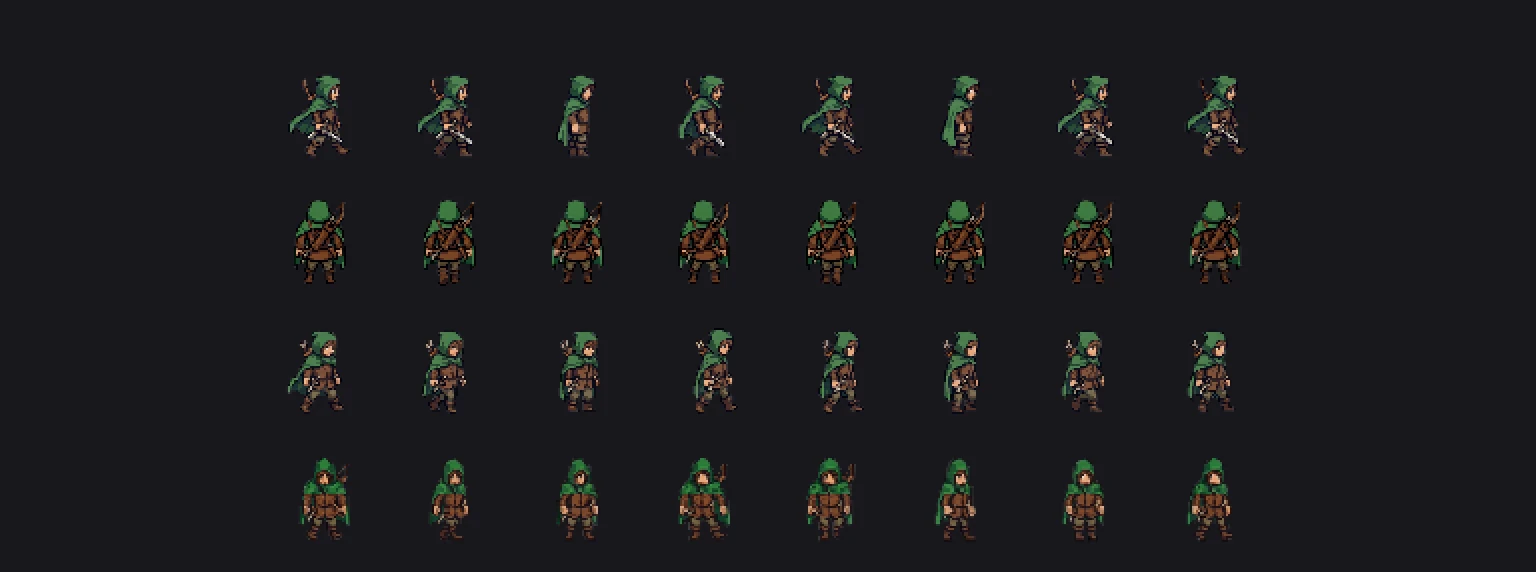
Every frame is padded to one 64x64 cell with the pivot at bottom center, so all animations stand on the same ground line.
3. Import into Unity
- Copy
atlas.pngandunity/atlas.png.metainto the same folder underAssets/. Unity reads the meta file and creates one sprite per frame. - Check the importer: Sprite Mode Multiple, Filter Mode Point (no filter), Compression None, mipmaps off.
- Pixels Per Unit is set to 100. For a tile-based game set it to your tile size (64 here) so one cell equals one Unity unit.
- If Unity generated its own meta file instead (for example because the GUID already exists in your project), open the Sprite Editor and slice by the rects listed in
atlas.json.
4. Make the animation clips
Select the eight frames of one animation in order, drag them into the Scene view, and Unity creates an Animation Clip and an Animator Controller. Set the clip to 12 samples per second (the fps in manifest.json) and turn on Loop Time for walk and idle. Repeat for each direction and put all four clips in one Animator with a blend tree or four states.
5. A minimal top-down player
using UnityEngine;

public class Player : MonoBehaviour
{
    public float speed = 3f;
    Animator animator;
    Rigidbody2D body;
    Vector2 input;

    void Awake()
    {
        animator = GetComponent<Animator>();
        body = GetComponent<Rigidbody2D>();
    }

    void Update()
    {
        input = new Vector2(Input.GetAxisRaw("Horizontal"), Input.GetAxisRaw("Vertical")).normalized;
        animator.SetFloat("MoveX", input.x);
        animator.SetFloat("MoveY", input.y);
        animator.speed = input == Vector2.zero ? 0f : 1f; // hold the frame when idle
    }

    void FixedUpdate()
    {
        body.MovePosition(body.position + input * speed * Time.fixedDeltaTime);
    }
}
In the Animator, use a 2D Simple Directional blend tree driven by MoveX and MoveY with the four walk clips at (0, -1), (-1, 0), (1, 0) and (0, 1).
Keep everything in one style
Generate enemies, NPCs, items and tiles in the same project and they inherit the palette, resolution and view angle of the ranger. Packs of up to eight icons cost the same 2 credits as one sprite, which makes the inventory and HUD cheap to match.
Using Godot instead? See the Godot version of this guide. For icons and HUD sizes, see the game icon sizes cheat sheet.
FAQ
Can I use AI-generated sprites in Unity?
Yes. Import them as Sprite (2D and UI) textures with Filter Mode Point for pixel art. A sprite sheet with a sliced meta file imports every frame in one step.
How do I slice an AI sprite sheet in Unity?
Set Sprite Mode to Multiple and slice in the Sprite Editor by grid cell size, or use a meta file that already contains the slices, as Sprixen's Unity package does.
What Pixels Per Unit should pixel art use in Unity?
Match it to your tile or character cell size, for example 16, 32 or 64, so one tile equals one unit and movement maps cleanly to the grid.
Generate sprites that actually match.
Style-locked sprite generation keeps every character, tile and animation in your project visually consistent. 6 free credits on signup, no credit card required.
Related Articles
AI Sprite Generator for GameMaker: Strips, Origins and Animation Speed
Generate pixel art sprites and walk cycles with AI and bring them into GameMaker as auto-sliced strip images, with the right origin, playback speed and a four-direction movement script in GML.
2D Walk Cycle Sprite Sheets: Frame Counts, Sizes and How to Generate a Consistent One with AI
How many frames a 2D walk cycle needs, which sizes and fps to use, strip vs grid layouts, and how to slice the sheet in Godot, Unity and Phaser.
Unity Sprite Sheet Slicing for AI-Generated Characters (2D Animation Setup)
How to slice an AI-generated sprite sheet in Unity's Sprite Editor, set correct import settings for pixel art, and build Animator states, plus how Sprixen's Unity package skips the manual slicing step.