
Best AI Sprite Animation Generators in 2026 (Walk Cycles, Attacks, 8 Directions)
AI sprite animation generators compared: how each one animates (text, image, skeleton, video, 3D), frame counts, directions, export formats and price per animation, plus a real 4 and 8 direction test.
Generating a sprite is solved. Animating it is where AI tools still differ a lot: some draw each frame from a text prompt, some rig a skeleton, some run a video model, and some render a 3D model. The method decides how many frames you get, whether the character stays the same across directions, and what you pay per animation. Prices and features below were read on each vendor's site on November 1, 2026.
TL;DR: For side-view games, most tools now give a usable walk, idle and attack. For top-down and isometric games that need 4 or 8 directions, consistency across directions is the hard part; tools with a dedicated 8-direction mode (PixelLab, God Mode AI, AutoSprite, Ludo.ai) or a 3D route (Sprixen's Character Studio) handle it best.
Comparison
| Tool | How it animates | Frames | Directions | Export | Cost per animation |
|---|---|---|---|---|---|
| Sprixen | Frames drawn from the sprite (standard), video model (premium), or a rigged 3D render (Character Studio) | 8 standard (16 or 24 with in-betweens), up to 96 premium | 8, per animation; all 8 at once in Character Studio | PNG sheets, atlas JSON, Godot, Unity, GameMaker, Phaser, RPG Maker MZ | 4 credits standard, 8 premium, 4 for 8 directions in Character Studio |
| PixelLab | Reference image plus text action; skeleton tool | 16 at 32 and 64 px, 4 from 65 to 256 px | 4 or 8 through the character tool | Not stated | 10 to 25 generations by size |
| God Mode AI | Image to animation; Spine path with auto rig | Not stated | Side, top-down, isometric 8 | PNG sheet with JSON, MP4, WebM, GIF, Spine 3.5 to 4.2 | 1 credit ($0.80 to $1.07); Spine 1 credit per character |
| AutoSprite | Image or text, keyframes, motion transfer from video | Not stated | 8 isometric, side, top-down | PNG sheet, atlas, frame ZIP | About 100 sheets on Starter ($12), 300 on Pro ($29) |
| Ludo.ai | Text, keyframes, reference video, 641 presets, video models | Up to 64 | 8 across 5 perspectives | PNG sheet, GIF, MP4, TexturePacker JSON | 1.5 to 20 credits |
| Sprite-AI | Prompt animates an existing sprite | 4 to 16 | Separate 8-direction rotate tool | PNG, GIF, sheet with JSON atlas | 14 to 20 tokens; 5 to 7 a month on Creator |
| Retro Diffusion | Prompt animations and Advanced Animations from one image | 4 to 16, looping | Rotate preset | Looping sheet and GIF | From $0.07; advanced from $0.10 |
| SpriteCook | Image to animation | Not stated | Not stated | PNG sheets, engine exports on paid plans | 20 to 26 credits |
What 4 directions drawn in 2D looked like
We generated a 64x64 top-down ranger in Sprixen and chained a walk for down, left, right and up: 2 credits for the sprite and 4 per direction, 18 in total. The four walks ran in parallel and each took about 10 minutes.
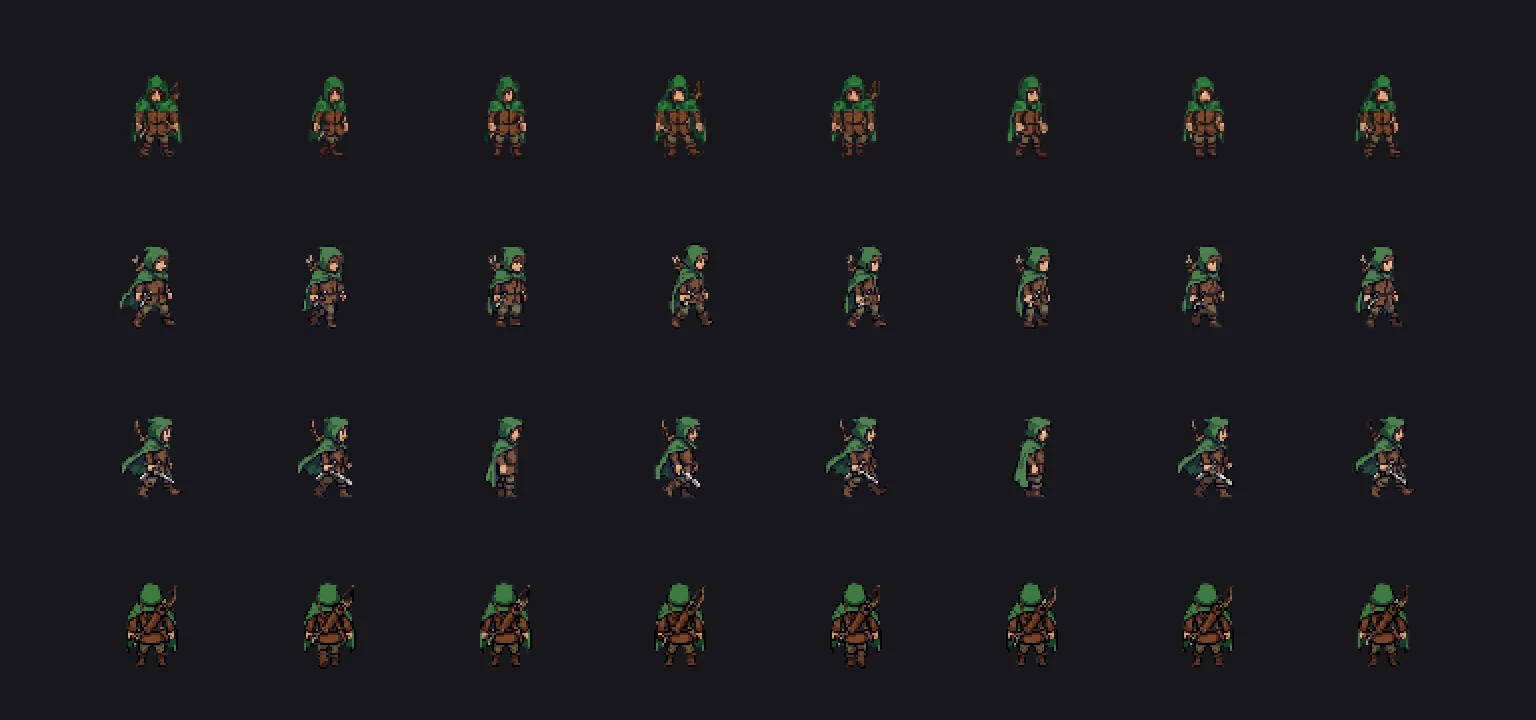
Down, left and up read well. The right-facing row shows the two problems every frame-by-frame method still has: in two frames the ranger turns the wrong way, and the bow on his back became a short blade. Each direction is drawn separately, so details can drift between rows. A critic pass catches some of this and retries; it did not catch these frames.
What 8 directions from a 3D model looked like
The same character idea through Character Studio: a rigged low-poly base customized from a sentence (2 credits, about 2 minutes), then the walk rendered from 8 camera angles at 64 px (4 credits, 29 seconds).
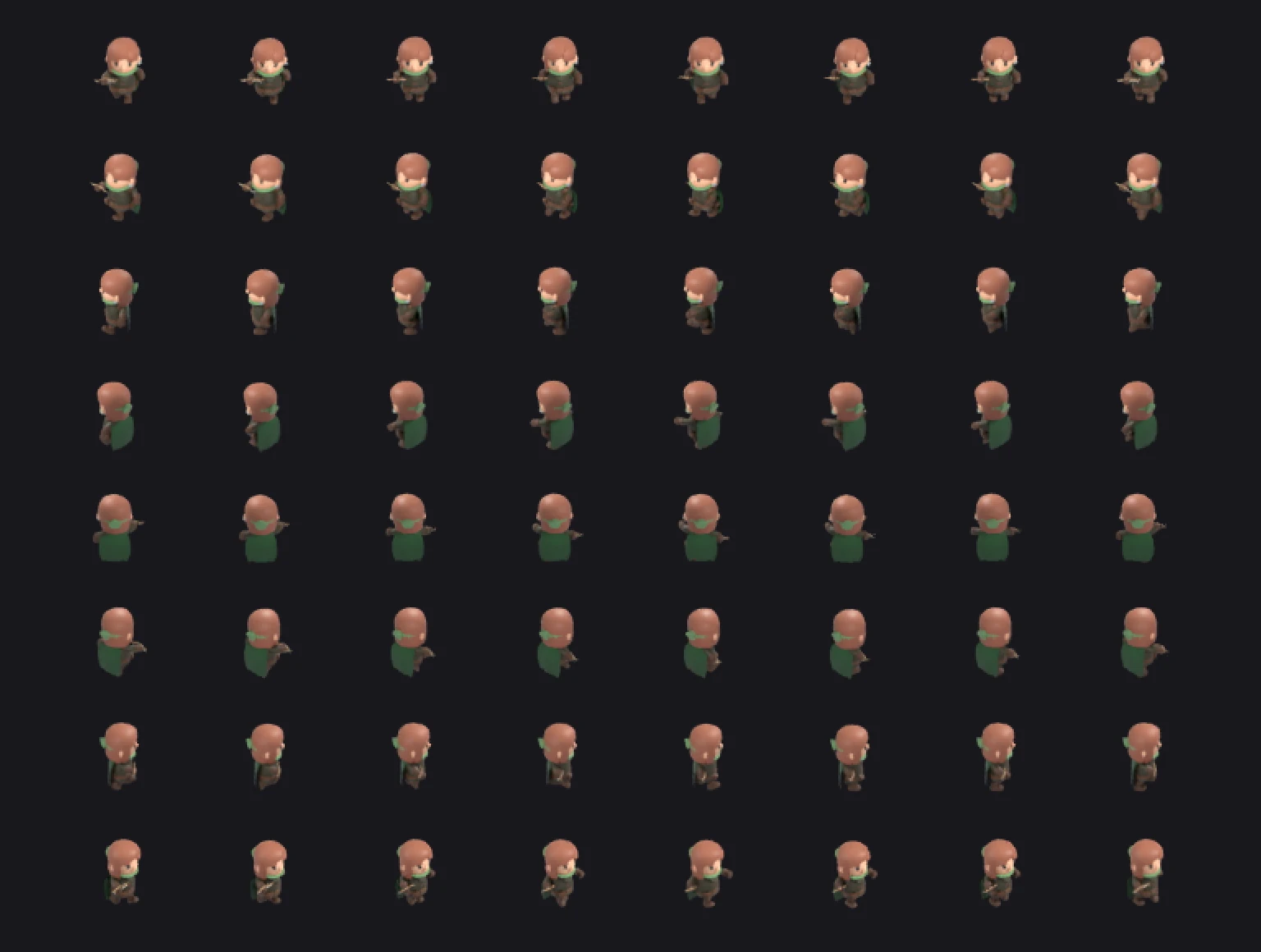
Every frame is the same character at the same scale, because it is one model seen from eight cameras. The trade-off is the look: a chibi low-poly style rather than hand-drawn pixel art, and edits built from primitives look rough (the hood we asked for became a green collar).
How to choose
- Side-view platformer or fighter: any frame-based tool works; pick by style and price.
- Top-down or isometric with 4 or 8 directions: use a dedicated 8-direction mode or a 3D route, and check the full set for drift before you build on it.
- Spine or skeletal animation: God Mode AI exports Spine directly.
- Long, smooth motion for a trailer or hero animation: video-based modes (Ludo's video models, Sprixen premium) give more frames at a higher price.
Our guide to 4 versus 8 directions for top-down sprites goes deeper into frame counts and mirroring.
FAQ
Can AI make sprite animations in 8 directions?
Yes. PixelLab, God Mode AI, AutoSprite and Ludo.ai have 8-direction modes, and Sprixen's Character Studio renders all 8 directions of a walk from one 3D model in about 30 seconds.
How many frames should a walk cycle have?
Eight frames at 10 to 12 frames per second is the common choice for pixel art; 4 to 6 frames is enough for small sprites, and 12 or more for smooth, larger characters.
Why does my AI character change between animation directions?
Frame-based tools draw each direction separately, so clothing and props can drift. Generate from a fixed reference sprite, check each row, regenerate the row that drifted, or render from a 3D model when exact consistency matters.
Generate sprites that actually match.
Style-locked sprite generation keeps every character, tile and animation in your project visually consistent. 6 free credits on signup, no credit card required.
Related Articles
Top-Down Sprite Sheets: 4 vs 8 Directions, Sizes and Frame Counts
When a top-down game needs 4 or 8 directions, how many frames that means, which directions can be mirrored, and how 2D drawn and 3D rendered sprite sheets compare in a real test.
Best AI Game Asset Generators in 2026: Sprites, Icons, Tiles, UI and 3D
The AI game asset generators worth using in 2026, compared on what they make (sprites, icons, tiles, UI, 3D), price, free tier, API and MCP access, with results from a real test session.
Best MCP Servers for Game Development in 2026 (Godot, Unity, Unreal, Blender, Roblox)
The MCP servers that let Claude Code, Codex and Cursor work inside game engines and generate game assets: Godot, Unity, Unreal, Blender, Roblox Studio, Aseprite and asset generators, with stars and install commands.