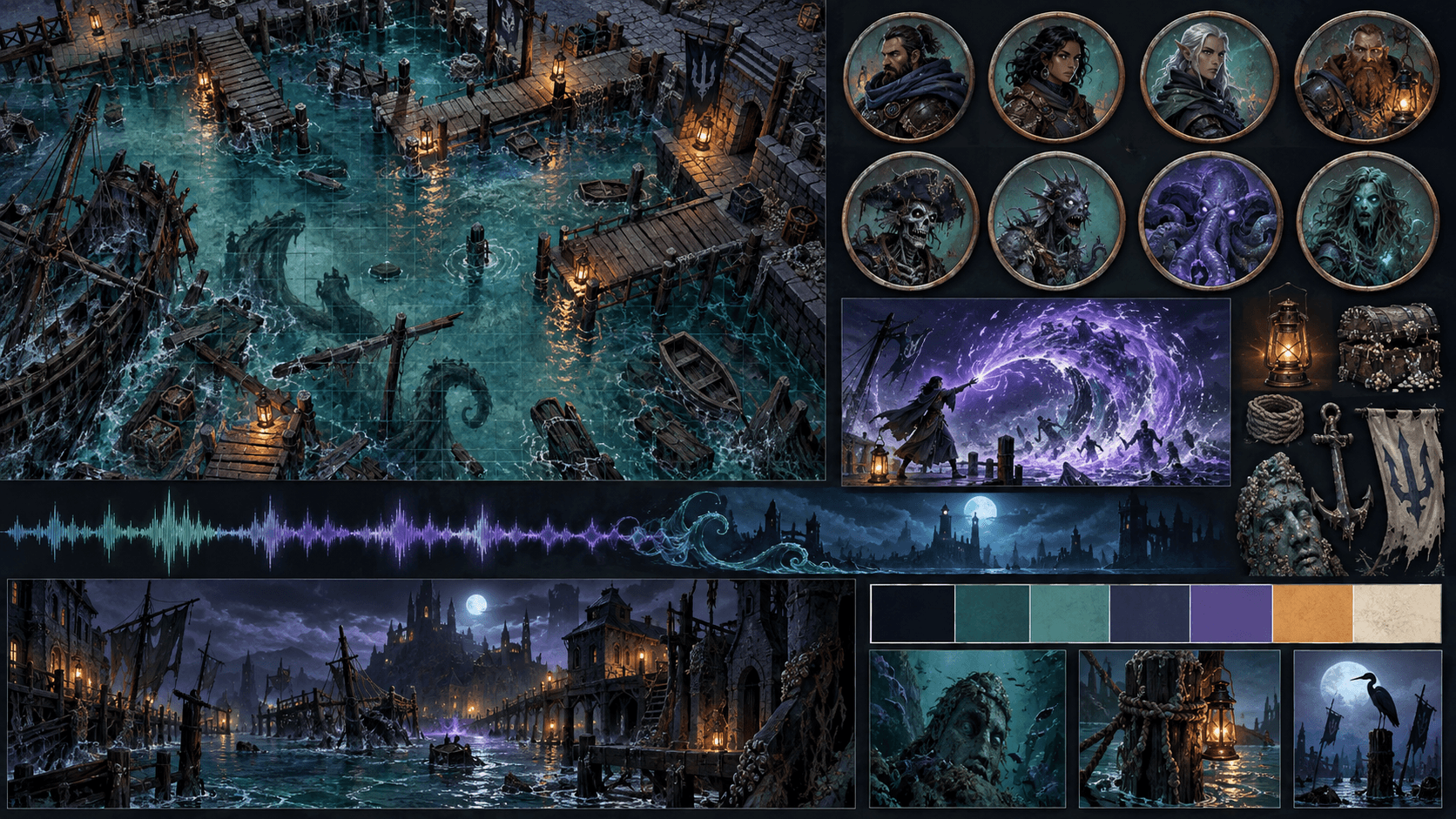
How to Build a Themed Adventure Set: Maps, Tokens, Effects and Audio That Match
A practical method for creating a coherent tabletop adventure set, from a narrow theme and palette to maps, tokens, effects, audio and reusable packaging.
A themed adventure set is not a pile of maps plus a pile of tokens. It is a small visual system that lets a GM move from one scene to another without the table feeling that the world changed artists between encounters.
The useful unit is a theme narrow enough to make decisions. “Fantasy dungeon” is too broad. “Flooded bell foundry under a city” gives you materials, lighting, architecture, monsters and sound. The narrower brief makes the set faster to produce and easier to reuse.
Define the theme before generating assets
| Decision | Example | Why it prevents rework |
|---|---|---|
| Location | Flooded harbor shrine | Sets architecture, props and movement problems |
| Material language | Wet stone, tarnished brass, algae glass | Gives surfaces a common vocabulary |
| Palette roles | Deep blue base, sea green light, amber signal | Connects maps, tokens and effects |
| Lighting rule | Warm sources are safe, violet sources are magical | Makes encounters legible at a glance |
| Silhouette rule | Round machinery against angular masonry | Creates contrast without changing style |
| Audio rule | Low water rumble, metal creak, short bell accents | Prevents every scene from becoming the same loop |
How much content does a short adventure need?
You do not need a giant library for one session. Start with one hero map, one alternate state, four to six character or creature tokens, two environmental props, two transparent effects and two or three audio loops. Add variants only when they change a decision at the table.
| Asset group | Lean one-shot set | Useful variant |
|---|---|---|
| Maps | 1 main scene | Damaged, flooded, night or revealed version |
| Tokens | 4 to 6 important figures | Alternate pose, condition or faction color |
| Effects | 2 effects tied to mechanics | Impact, portal, fire, fog or status variation |
| Audio | 2 loops and 1 short cue | Exploration, combat and transition versions |
| Props | 2 or 3 objects players can interact with | Broken, open or activated state |
Produce in dependency order
- Write the style brief: theme, palette roles, camera, materials, silhouette and exclusions.
- Make the hero map: it establishes scale, architecture, light direction and the visual density of the set.
- Make tokens: derive character and creature treatments from the map's palette and lighting instead of starting from generic portraits.
- Make effects: reserve the brightest colors for mechanics the players need to notice.
- Make audio: write down what each loop is for and where it stops or changes.
- Build the alternate state: alter one meaningful condition rather than recoloring everything.
Consistency is more important than isolated quality
One stunning map paired with tokens from three art directions is less convincing than a restrained set that agrees. Compare the map, token and effect at the size they will appear in the VTT. A shared palette is helpful, but shared edge treatment and light direction often matter more.
Keep a small reference board beside every generation or drawing pass. If a new token needs a different material, explain why in the brief. This turns variation into worldbuilding instead of drift.
Packaging for reuse
Use folders that mirror how the GM thinks: maps, tokens, effects, audio, references and licenses. Include a readme with grid size, image dimensions, intended VTT, audio loop notes and the license for every external asset. A file that cannot be found during a session is effectively missing.
Where AI helps and where it should stop
AI is good at exploring a narrow theme, producing related visual directions and filling out a set after the style has been chosen. It is bad at deciding whether a corridor is five feet wide, whether a secret door should be visible to players or whether a loop will annoy a table after twenty minutes. Keep those decisions with the GM and validate the final assets in the VTT.
Sprixen's battle map tools can help with the visual starting point and matching companion assets. The valuable workflow is not “generate everything.” It is “make the next asset agree with the assets already approved.”
For the table side of the workflow, Foundry's content creation guide is a useful reminder that grid precision, wall placement and scene readability are part of content quality. Apply the same discipline to maps, tokens, effects and audio: every asset should support the next action at the table.
Make game art that stays in one style.
Generate sprites, animations, tiles and effects that share one locked style per project, in the web app or straight from Claude Code and Cursor. 6 free credits on signup, no credit card required.
Related Articles
How to Make Seamless Game Music Loops with AI
A practical workflow for generating, editing and testing loopable game music with AI, including loop points, stems, loudness and engine export.
How to Make D&D Tokens for Foundry VTT and Roll20 (Sizes, Borders, Formats)
Pixel sizes, borders, and file formats for D&D tokens in Foundry VTT, Roll20, Fantasy Grounds, and Owlbear Rodeo, plus the fastest ways to make a full party's worth.
D&D Battle Map Size and Grid Guide (Foundry, Roll20, Print)
Grid math, pixel sizes, and print resolution for D&D battle maps across Foundry VTT, Roll20, Fantasy Grounds, and Owlbear Rodeo, with a worked file size example.