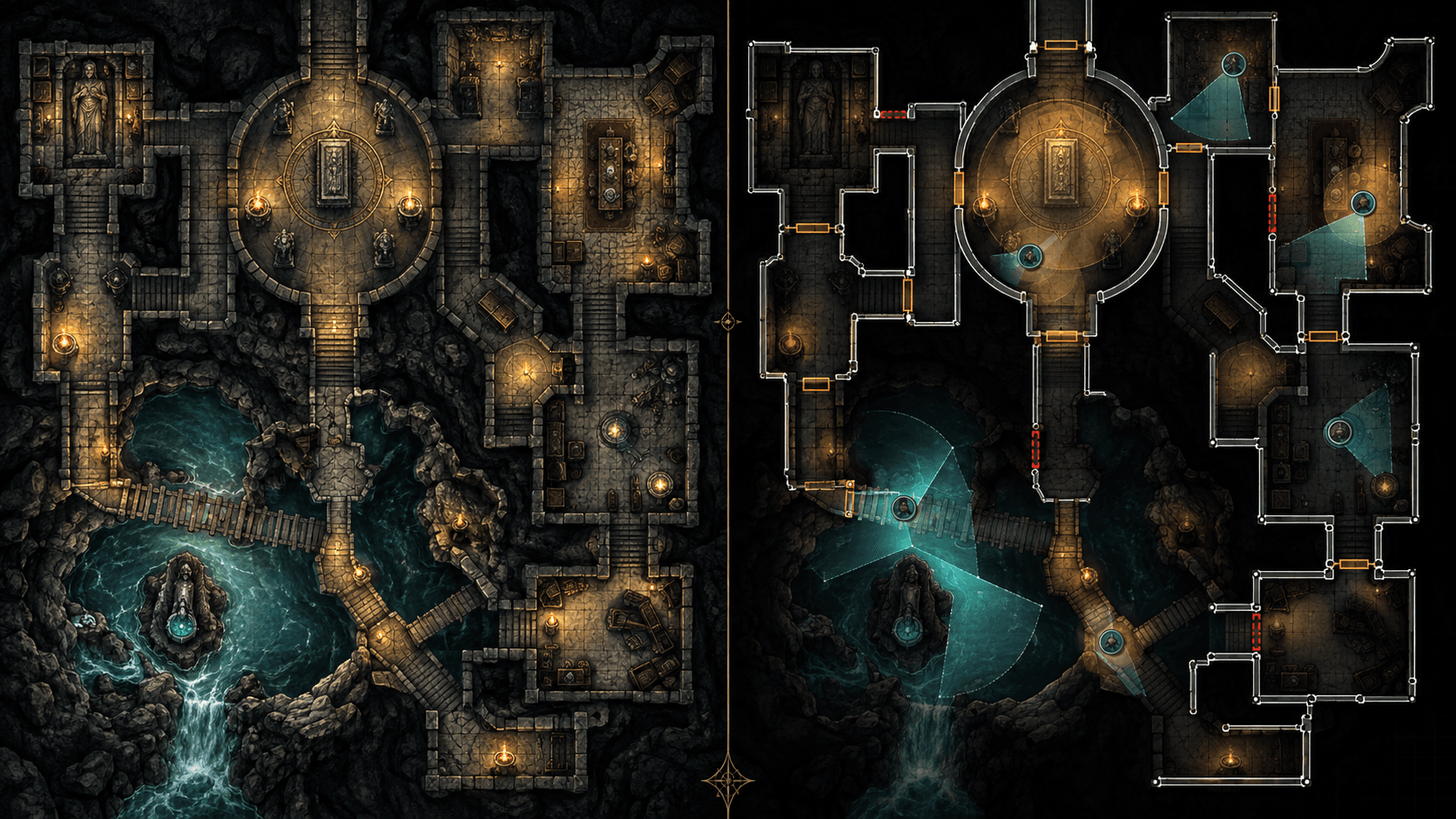
Foundry VTT Walls and Lighting: Turning a Map Image into a Playable Scene
A practical Foundry VTT guide to walls, doors, secret doors, token vision, ambient light and a 15-minute scene preparation workflow.
A battle map image answers “what does this place look like?” A Foundry scene must also answer “where can the token move, what can it see, what can the light reach and which doors can open?” The difference between those two products is the preparation layer.
Foundry's walls and lighting system is powerful because it is explicit. A wall can block movement, vision, light or sound. A door can open. A secret door can look like a normal wall to players. Lighting and token vision then turn those boundaries into the information a player receives.
The scene preparation table
| Layer | What it controls | Minimum question | Typical error |
|---|---|---|---|
| Map image | Visual appearance | Does the grid and scale match the scene? | Beautiful image imported one square off |
| Normal walls | Movement, vision, light and sound | Where are the solid boundaries? | Tracing decorative art instead of playable geometry |
| Doors | Openable boundaries | Which passage changes during play? | Making every doorway a permanent wall |
| Secret doors | Hidden interactive passage | What should the GM control before discovery? | Using a visible door icon that reveals the secret |
| Lights | Illumination and atmosphere | What does a token actually see? | Adding bright lights without checking wall leakage |
| Token vision | Player perception | Does the token have the right range and mode? | Testing with a GM token that bypasses the player experience |
What walls actually do
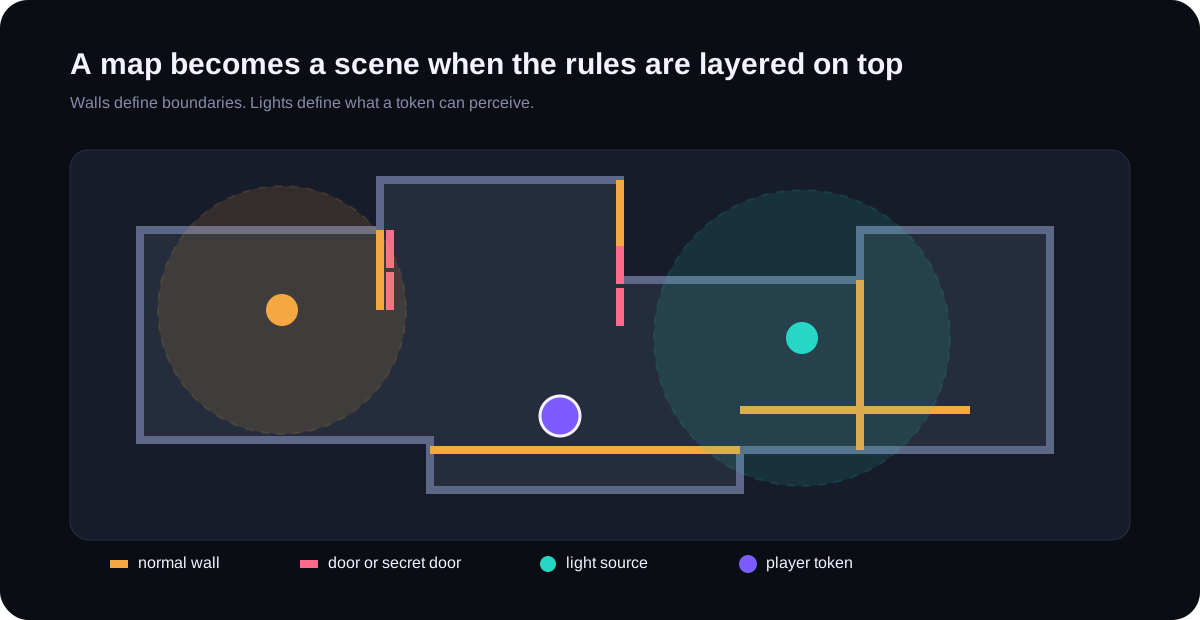
Foundry's official Walls article defines walls as boundaries that can restrict token movement, line of sight and sound. The default wall is not the only option. Terrain walls, invisible walls, ethereal walls, doors, secret doors and window walls each express a different gameplay rule.
Use normal walls for a solid boundary. Use a door when the passage has a state. Use a secret door when the interaction should not be obvious to players. Use an invisible wall for an invisible gameplay boundary, not as a shortcut for a wall that was hard to trace. Use a terrain wall when you want the obstacle to affect movement while allowing some perception through it.
Lighting is not decoration
Foundry's Lighting documentation explains how light sources and darkness interact with walls and fog of war. A bright-looking map can still be dark to a player token if the scene requires token vision and no valid light reaches it. Conversely, a wall error can make a supposedly hidden corridor visible from the other side.
Test lighting from a player token, not from the GM's omniscient view. Place one token in the most restrictive room, one near a door and one outside the scene. Check what each sees after walls and lights are finalized.
A 15-minute preparation workflow
- Minute 0 to 2: Create the scene, set the background image and confirm the grid dimensions in squares and pixels.
- Minute 2 to 7: Draw the large structural walls first. Use the center of the graphical wall instead of tracing every texture edge.
- Minute 7 to 9: Convert passages into doors or secret doors where the encounter needs a state change.
- Minute 9 to 12: Add the minimum light sources needed for the intended mood. Avoid lighting every decorative lamp before testing vision.
- Minute 12 to 14: Place a test token and inspect line of sight from rooms, corridors and thresholds.
- Minute 14 to 15: Walk the scene as a player and keep a static fallback image if the map is heavy.
Where maps usually leak
Most light leaks are not mysterious engine bugs. They come from gaps, walls drawn on the wrong side of a doorway, accidental diagonal segments or tracing the outer edge of a thick illustrated wall instead of its playable center. Foundry's content creation guide recommends using the sub-grid and placing walls approximately at the center of graphical walls for better alignment.
What a prepared pack should include
| Deliverable | Useful to the GM | Still needs a decision |
|---|---|---|
| Grid-aligned map | Fast scene creation | Scene dimensions and background scaling |
| Wall layer | Less manual tracing | Whether a decorative boundary is playable |
| Door states | Interactive entrances | Permissions and locked state |
| Lighting setup | Immediate atmosphere and vision | Token vision mode and encounter darkness |
| Fallback flat image | Resilience for slow clients | When to use it during the session |
Sprixen's battle map workflow can help create a visual starting point and matching props, but a generated PNG is not automatically a Foundry scene. Treat walls, lights, permissions and player-view testing as part of the product. That is what turns a nice map into a reliable session tool.
Make game art that stays in one style.
Generate sprites, animations, tiles and effects that share one locked style per project, in the web app or straight from Claude Code and Cursor. 6 free credits on signup, no credit card required.
Related Articles
The Best Animated Battle Map Tools in 2026: A Practical Comparison
Animated maps are useful when motion communicates gameplay. Here is how Foundry, Roll20, Owlbear, Czepeku, Dungeon Alchemist and Sprixen compare on format, setup and table performance.
How to Import the Same Battle Map into Roll20, Foundry and Owlbear Rodeo
A VTT-neutral workflow for sizing, aligning and testing one battle map across Roll20, Foundry VTT and Owlbear Rodeo without rebuilding the art three times.
9 Best D&D Character Creators in 2026 (Free, AI and Official)
D&D Beyond, Roll20 Charactermancer, Foundry VTT, Dicecloud, PCGen, Fantasy Grounds, Hero Forge, CharGen and Sprixen compared on price, system support, character art and VTT export.