
How to Make a Game in the "omw" Style: The Dark Gothic Pixel RPG Look Explained
How the viral "omw" dark gothic pixel RPG look works: low-res 3D, a 16 color palette, dithering, fog, torch against moonlight, plus a Godot 4 setup you can copy.
The "omw" style is a 3D world rendered at a very low resolution, forced into a small dark palette with ordered dithering, lit by warm torches against cold moonlight, and sampled with nearest neighbor so every texel stays a hard square. It looks like a lost 1990s RPG, and each part of it is a rendering decision you can make in Godot, Unity or three.js today. Below: where the look came from, what it is made of, the two scenes we built to reproduce it, and a Godot setup you can copy.
Where the "omw" look came from
On July 20, 2025, the X account @de5imulate posted a short first-person clip captioned "omw": two hands holding a torch and a sword, a path through fields, a town and a castle in the distance. Know Your Meme reports it passed 33 million views and 140,000 likes in three days. It spread as AI-generated footage, and game designer Tim Soret replied the next day: "Interesting to see the praise for this AI-invented visual style." Other players answered with stills from Daggerfall (1996) and older games to show the style had roots.
The clip also led to a real game. According to Vida Extra, the backlash against those AI retro RPG videos pushed developer Dominick John to build a playable game with the same mood and no AI-generated content. That game is Project Shadowglass by Starhelm Studios, a first-person immersive sim in the tradition of Thief and Deus Ex, built in Godot. TechSpot described it as reproducing the look commentators said only generative tools could make, with custom 3D rendering that keeps the blocky low-resolution feel while you move freely through the world. Wikipedia cites a GamesRadar report of 58,000 Steam wishlists and public support from Larian's Swen Vincke.
What the look needs is a short list of rendering rules, applied to everything on screen at once.
What makes the look, technically
| Element | What to do | Value we used |
|---|---|---|
| Internal resolution | Render the 3D small, scale up by a whole number | 480x270, scaled 4x to 1920x1080 |
| Palette | Quantize the final frame to a few dark colors | 16 colors in the project style; 22 in the castle scene |
| Dithering | Ordered 4x4 Bayer pattern on the low-res grid | Turns the sky gradient into a regular checker |
| Filtering | Nearest on textures and on the upscale | No blur anywhere |
| Texel density | Same texture pixels per meter on every surface | 32 px per meter |
| Fog | Dark fog swallows the distance | #0b0c10 at density 0.45 in the bible |
| Light | Warm fire against a cold moon | Warm #ffdf9e, cold #7e9eb4, ambient #181a20 |
Two more traits come from how the old games were built. First-person hands and weapons are 2D sprites drawn over the 3D view, and enemies are often billboards that swap between 8 directions as you circle them. Both are cheap, and both hide a low polygon count.
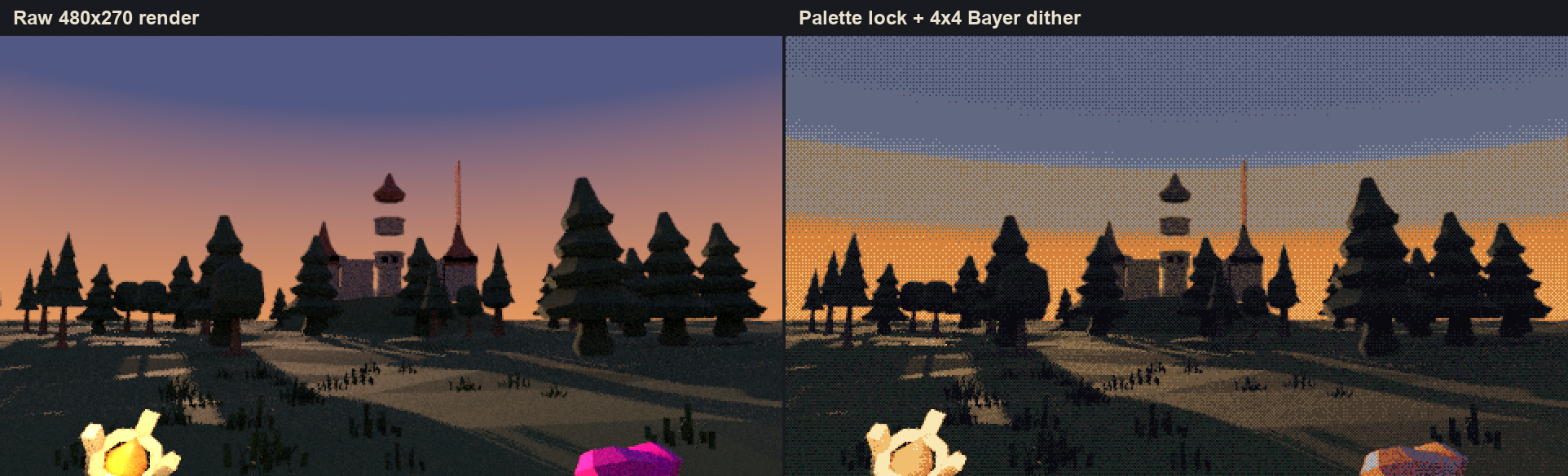
The comparison above is one frame before and after the post process. The raw render already has the composition; the palette and the dither make it read as pixel art. The cost is close to zero: the render took about 2 seconds on a laptop CPU, and the same filter runs in real time in a browser.
Our proof: a castle field and a dark hall
The castle field uses CC0 pieces only: a castle from a Kenney kit, pine trees, grass, a KayKit torch and a Kenney sword, with colors locked per object type. It was rendered at 480x270, reduced to a 22 color palette, dithered with a 4x4 Bayer matrix and scaled up 4x. The mood is there. The weak spots were the first-person hands and weapons, a castle assembled without fitting its parts, and the lack of small, chunky textures. Sprixen's 2D side covered the hands and the textures in the same session: pixel art hands holding a torch and a sword with an 8 frame idle, and seamless 128 px stone and grass textures applied at 2 m and 3 m, so every surface shared one texel size.
The dark hall started from this reference, generated in a Sprixen project, which then became that project's style bible:
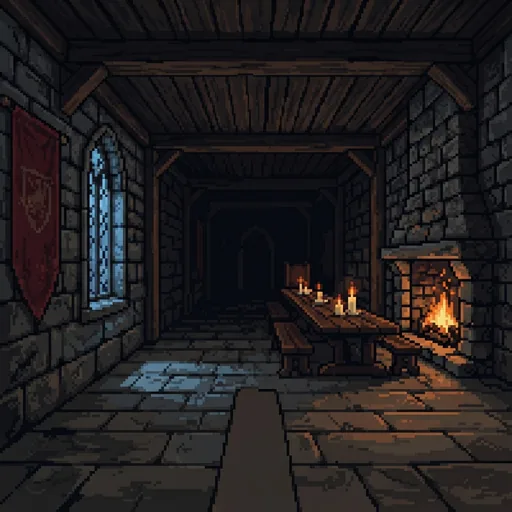
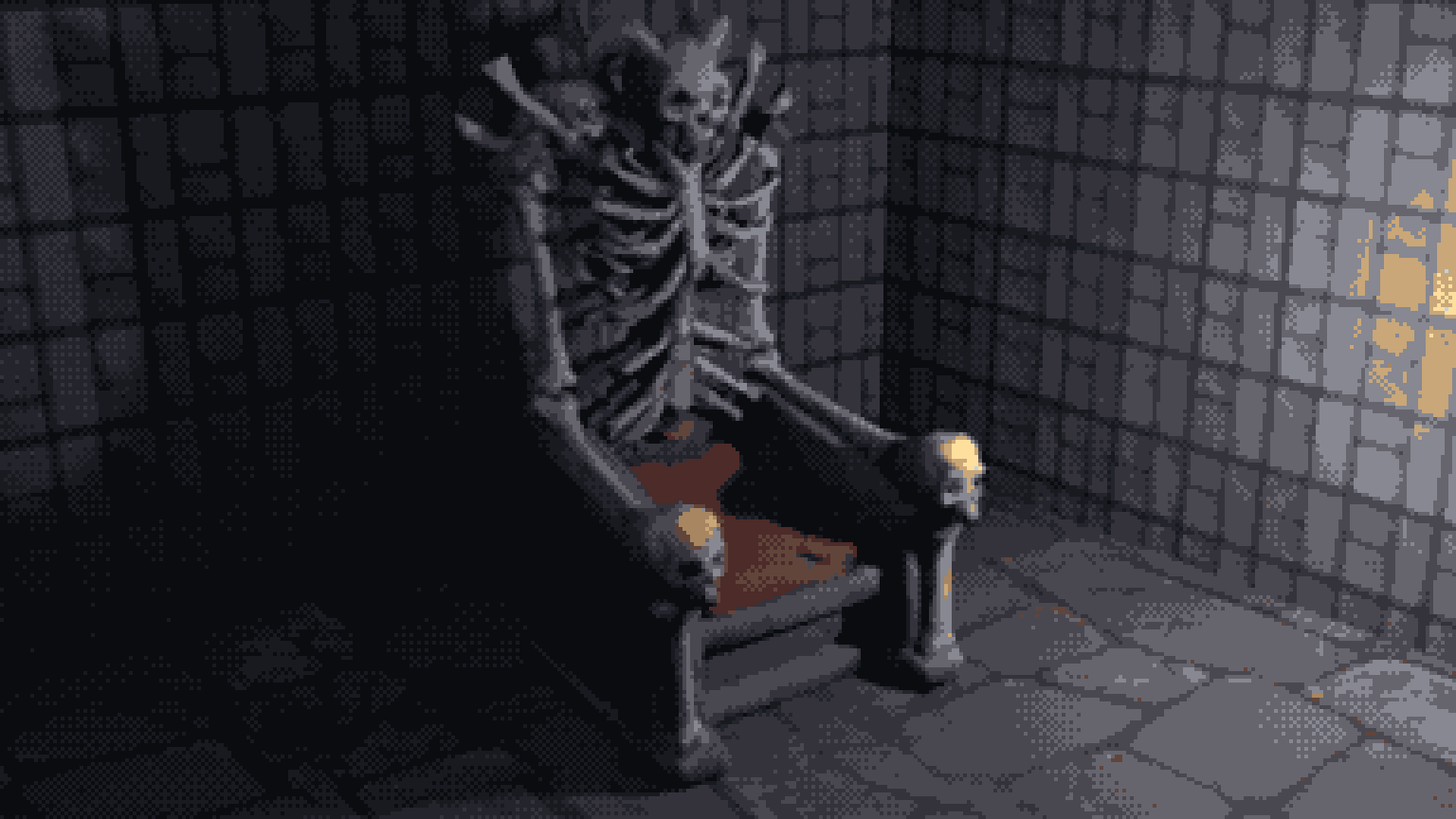
Every 3D asset we made for that project went through the bible: real size, pivot on the floor, 128 px textures with nearest filtering, and colors locked to 11 to 14 of the 16 palette colors. Rendered in a stone room with one warm light and one cold light, a bone throne generated from a 2D concept already looks like it belongs in the clip's world.
How to get there with Sprixen
- Pick a reference. A dark interior or exterior with the palette you want, some firelight and some moonlight. Generate it inside Sprixen or upload art you own.
- Create the project style. In your project, set the style from that image for 6 credits. You get the 16 colors, the texel density, nearest filtering, the light colors, the fog and six seamless materials.
- Keep accent colors on purpose. If banners or blood need a saturated red, make sure the palette keeps one, or palette lock turns it brown.
- Build the world from library pieces and generated hero assets. Furniture, barrels and walls come from CC0 library pieces adapted to the style for 2 credits each; the boss, the throne and the creatures come from image-to-3D.
- Make the 2D layer in the same project. First-person hands, weapon sprites, HUD icons and fire loops follow the same palette.
- Set up the engine with the settings below.
How one image turns into rules that both sprites and models follow is covered in depth in one art style across 2D and 3D.
Godot 4 settings for the omw look
- Display, Window: Viewport Width 480 and Height 270, Window Width Override 1920 and Height Override 1080, Stretch Mode viewport, Stretch Scale Mode integer.
- Materials: Sampling, Filter set to Nearest on every StandardMaterial3D.
- WorldEnvironment: background color #0b0c10, ambient light #181a20 at low energy, fog enabled with Light Color #0b0c10, density raised until the far wall fades to black.
- Lights: one OmniLight3D per torch in #ffdf9e with a small random flicker on its energy, and a DirectionalLight3D or SpotLight3D in #7e9eb4 for moonlight through the windows.
- Post process: a CanvasLayer holding a full screen ColorRect with the shader below, plus a 16x1 PNG that holds the project palette.
shader_type canvas_item;

uniform sampler2D screen_tex : hint_screen_texture, filter_nearest;
uniform sampler2D palette : filter_nearest;  // 16x1 PNG with the project palette
uniform int palette_size = 16;
uniform float dither_strength = 0.08;

void fragment() {
    float bayer[16] = { 0.0, 8.0, 2.0, 10.0, 12.0, 4.0, 14.0, 6.0,
                        3.0, 11.0, 1.0, 9.0, 15.0, 7.0, 13.0, 5.0 };
    ivec2 p = ivec2(FRAGCOORD.xy) % 4;
    vec3 c = texture(screen_tex, SCREEN_UV).rgb;
    c += (bayer[p.y * 4 + p.x] / 16.0 - 0.5) * dither_strength;

    vec3 best = c;
    float best_d = 1e9;
    for (int i = 0; i < palette_size; i++) {
        vec3 pc = texture(palette, vec2((float(i) + 0.5) / float(palette_size), 0.5)).rgb;
        float d = distance(c, pc);
        if (d < best_d) { best_d = d; best = pc; }
    }
    COLOR = vec4(best, 1.0);
}
With a 480x270 viewport, FRAGCOORD counts low-res pixels, so the dither pattern lands on the same grid as the texels. Raise dither_strength for stronger checkerboards in gradients, or set it to zero to see plain palette banding.
Common mistakes
- Dithering at full resolution. The checker shrinks into fine grey noise. Dither on the low-res grid.
- Linear filtering anywhere. One blurred texture or a smooth upscale breaks the illusion.
- Mixed texel densities. A prop with a 4K texture next to 32 px per meter walls looks pasted in.
- Bright ambient light. The style lives in its black areas; keep ambient near #181a20 and let the torches do the work.
- Lost accent colors. Check the palette for the reds and golds your banners and treasure need.
FAQ
What is the omw style?
It is the dark gothic pixel RPG look of the "omw" clip posted by @de5imulate in July 2025: a first-person 3D world rendered at low resolution, with a small dark palette, dithering, fog, and warm firelight against cold moonlight.
Was the omw video made with AI?
It spread as AI-generated footage, which is why Tim Soret called it an "AI-invented visual style". Players pointed out that Daggerfall and other 1990s games had a similar look, and Project Shadowglass later showed it running in a real Godot game made without generated art.
What resolution should I render a dark pixel RPG at?
We used 480x270, which scales by exactly 4 to 1920x1080. 320x180 gives a chunkier look and scales by 6. Pick a size that divides your target display evenly so every pixel stays the same width.
How many colors should the palette have?
16 worked for our project style and 22 for the castle field. Fewer colors mean more visible dithering and an older look; keep one or two saturated accents for banners, blood and treasure.
Can I build this look in Unity or three.js?
Yes. In Unity, render the camera to a low-resolution Render Texture with Point filtering and draw it full screen through a palette shader. In three.js, the RenderPixelatedPass from the postprocessing examples handles the low-res render, and a small ShaderPass can add the palette and the dither.
Make 3D assets that match your game.
Set a project style from one reference image, then generate or adapt textured GLB models in real-world meters, auto rig them and add in-place animations for Godot, Unity or three.js.
Related Articles
How to Make 3D Game Assets with AI: A 2026 Guide from Real Tests
How to make 3D game assets with AI: a style bible from one reference, library models vs custom generation, real sizes, rigging, GLB export and the pitfalls we hit.
How to Rig and Animate 3D Characters with AI: Auto Rig, Mixamo Names and In-Place Clips
Auto rig humanoids and creatures with AI, get Mixamo bone names for engine retargeting and in-place clips for game loops. What to check before export, and why held props need a hand socket.
Import AI Sprites into Godot 4 with SpriteFrames (AnimatedSprite2D Guide)
How to get AI-generated sprite sheets into Godot 4 using SpriteFrames and AnimatedSprite2D, with the Sprixen Godot addon, the manual slicing path, and common import mistakes.