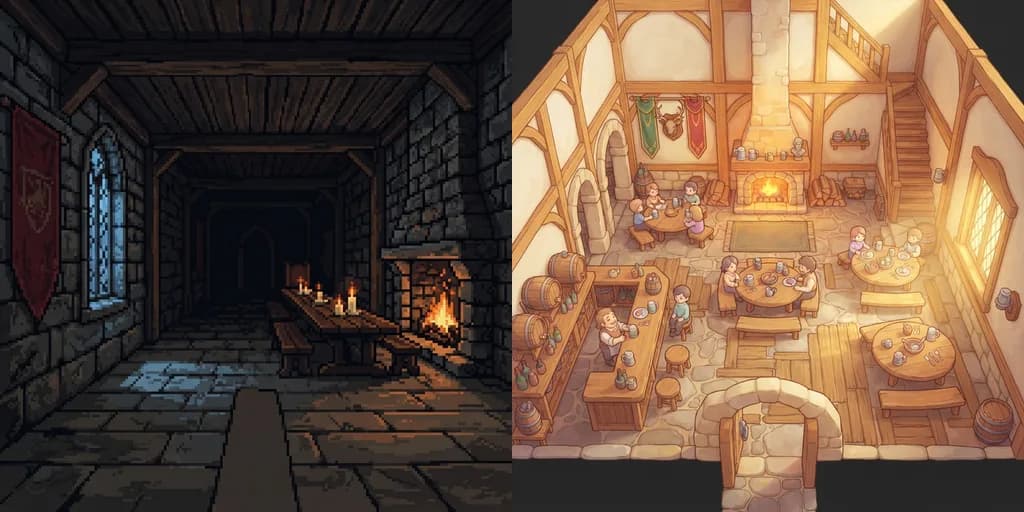
One Art Style Across 2D and 3D Game Assets: How One Reference Image Sets the Rules
How one reference image becomes a style bible that every 2D and 3D asset follows: palette, texel density, filter, proportions, wear, light and six materials. Two real bibles compared.
One art style across 2D and 3D comes from rules that every asset obeys: one palette, one texel density, one texture filter, one set of proportions and wear, one light setup and one set of materials. Sprixen reads those rules from a single reference image and stores them as the project's style bible, so a sprite, a tile, a fire loop and a 3D table generated in that project land in the same world. We tested it by giving the same request, "a medieval room for my game", to two projects with opposite references.
The test: one request, two opposite games
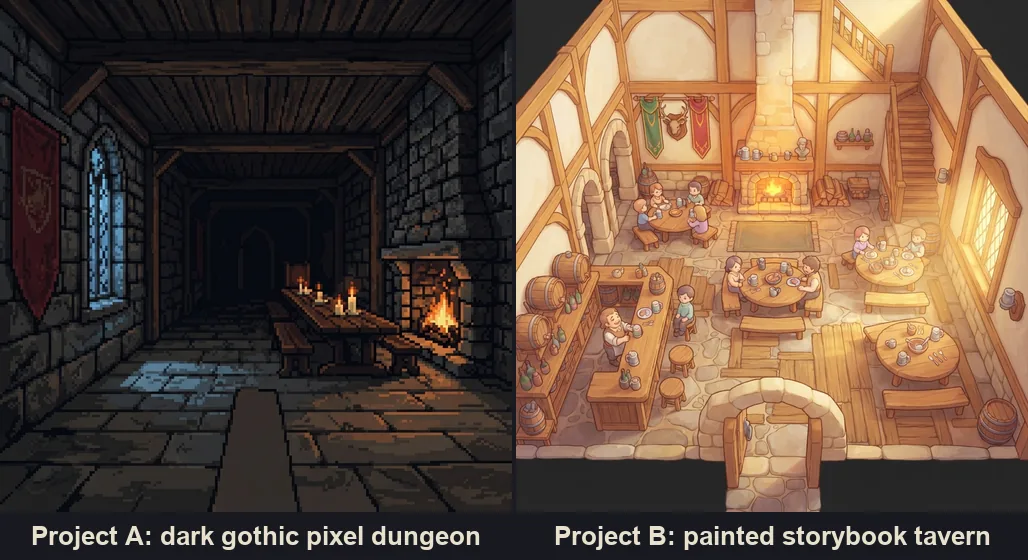
Project A got a dark gothic dungeon in pixel art. Project B got a warm, hand-painted storybook tavern. Both rooms were built from the same 17 CC0 pieces from the Fantasy Props MegaKit by Quaternius, so every difference between the two rooms comes from the rules.
What the bible contains
From each reference Sprixen extracted a style bible, and the two came out far apart:
| Rule | Project A, dark dungeon | Project B, painted tavern |
|---|---|---|
| Summary | Dark medieval retro dungeon, heavy dithering, fire against moonlight | Cozy storybook tavern, soft watercolor textures, clean low poly shapes |
| Texel density | 32 px per meter | 256 px per meter |
| Filter | Nearest, pixelated screen | Linear, no pixelation |
| Thickness and height | 1.15 and 0.95 | 1.15 and 0.95 |
| Roundness | 0.1 | 0.7 |
| Wear | 0.65 | 0.25 |
| Ambient, warm key, cold key | #181a20, #ffdf9e, #7e9eb4 | #85737a, #ffd175, #c7d2e8 |
| Fog | #0b0c10 at 0.45 | #eddcc9 at 0.05 |
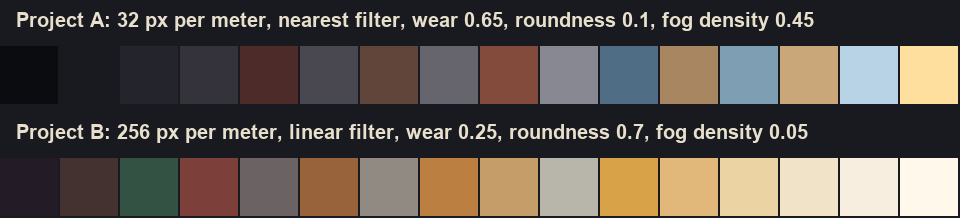
The palettes tell the story at a glance. A runs from near black (#0b0c10) through slate greys and rust to a single candle yellow (#ffdf9e), with three cold blues for moonlight. B runs from dark plum through honey, oak and cream to #fff8eb, with one green and one red for banners. Both stop at 16 colors, the set every texture is locked to.
The bible also writes one sentence per material. For A's metal: "Dark forged wrought iron with stark specular dither highlights and matte shadowed edges." For B's wood: "Warm honey-oak stylized wood texture with soft painted grain and highlighted beveled edges." Those sentences drive the material textures.
Six materials per project
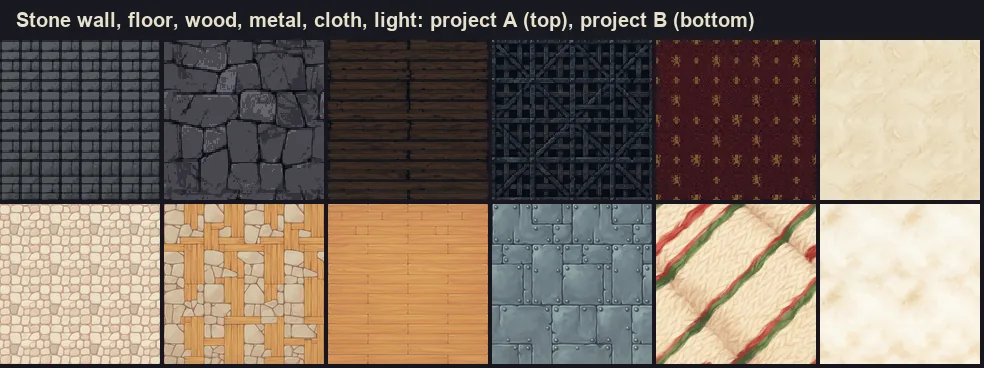
Each project gets six seamless textures: stone wall, floor, wood, metal, cloth and light. In our test 9 of the 12 came out right on the first try. B's metal and cloth were fixed on a second pass, and A's floor needed a crop and a seam fix. Sprixen now checks each material and regenerates the ones that fail, and all six are included in the 6 credit project style.
The textures do double duty. In 3D they tile walls and floors at the bible's texel density and act as color targets when library models are adapted to the project, which costs 2 credits a piece. In 2D, the project's sprites, tiles and effects follow the same palette and materials, so a barrel sprite and a barrel model share their wood.
How the rules restyle 3D: the same 17 pieces, twice
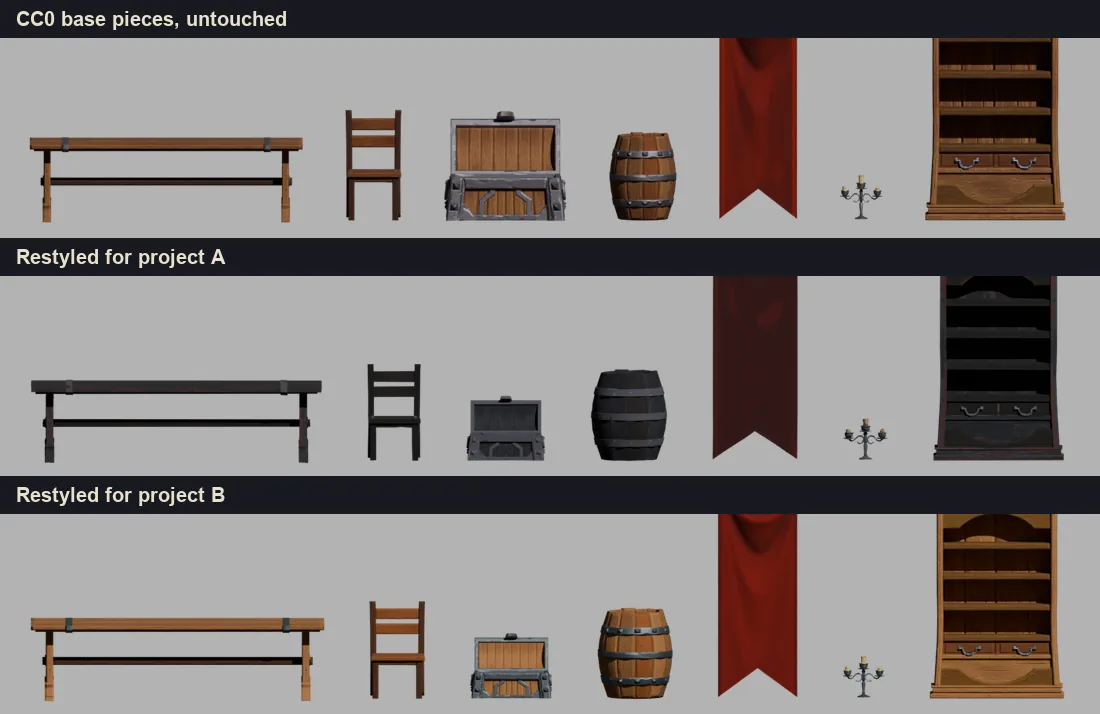
The kit's pieces share four trim sheets, textures that many models map into: furniture, metal, cloth and props. That makes them the lever. Repainting four textures restyles the whole kit and keeps every UV intact. We repainted the four trims of each project with the reference as a guide, and 2 of the 4 kept their layout. An edge correlation check told the good repaints (0.74 and 0.84) apart from the broken ones (0.46 and 0.45). The broken trims were recolored instead, with a color transfer in Lab space toward the project's matching material and the palette locked for A. The transfer worked once each trim targeted its own material, for example the wood texture for the furniture trim.
Geometry follows the bible too:
- Proportions. Thickness 1.15 and height 0.95 make both kits slightly heavier and lower, with a small random jitter so repeated pieces vary.
- Wear for A. Wear 0.65 chips edges by moving vertices. The displacement has to be a function of the rounded vertex position, or vertices that share a position along a UV seam move apart and open cracks.
- Bevels for B. Roundness 0.7 softens edges with a bevel, applied only to pieces under about 3,000 faces, because bevels multiply the face count.
- Real size and pivot. Every piece leaves in meters with its pivot on the floor; after the jitter, the large table is 2.85 m long in A and 2.90 m in B.
How the rules restyle 2D
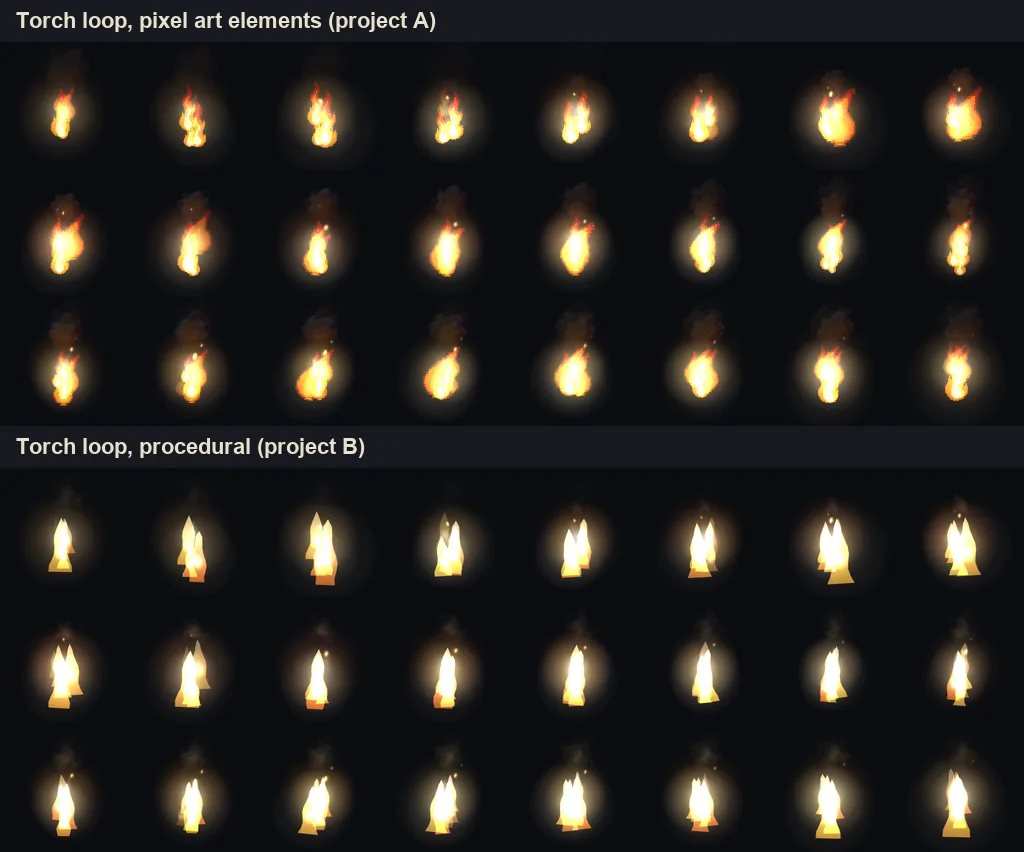
The same bible governs flat art. The fire in both rooms came from VFX Studio: project A used a pack of pixel art fire elements and B a procedural flame, 8 credits for the torch and hearth loops of both rooms. They read as two different games even at sprite sheet scale.
Sprites, tiles and parallax layers made in a project pick up its palette in the same way. That matters most in games that mix both, such as a 3D world with 2D first-person hands, HUD icons and billboard enemies, the setup behind our guide to the omw style.
When the rules are not enough
- A reference close to the base kit changes little. B's painted tavern already resembles the Quaternius kit, so B's pieces barely moved. For each game to come out unique, vary the base as well: pick among equivalent pieces in the library, kitbash, texture key pieces one by one, and generate the hero pieces.
- Accent colors need room in the palette. A 16 color palette without a saturated red turns red cloth brown. Keep one or two accents from the reference.
- Architecture in the reference leaks. A reference full of arches and walls can push generated views to add arches and walls. Use it for palette, texture and dithering, and check silhouettes.
How to set it up
- Pick the image that best represents the game: concept art, a screenshot of your prototype, or a sprite from the project.
- Create the project style from it for 6 credits, then check the palette for the accents you need.
- Generate or adapt everything for that game inside that project: sprites, tiles, effects and 3D models.
- If the direction changes, recreate the style from a new reference; new assets follow the new bible.
FAQ
What is a style bible in game art?
A short set of rules every asset follows: the palette, texel density, texture filter, proportions, wear, lighting colors and materials. In Sprixen it is generated from one reference image and stored on the project.
How do you keep 2D and 3D game art consistent?
Give both the same rules. Lock sprites and model textures to one palette, use one texel density and one filter, share the material textures, and light the 3D scene with the colors the 2D art already implies.
What texel density should a pixel art 3D game use?
We used 32 px per meter for a chunky retro look, so a 2 m wall shows 64 texels. The painted tavern used 256 px per meter. Pick one value per game and apply it to every surface.
Can I change the project style later?
Yes. Recreate it from a new reference, and the assets you generate after that follow the new rules.
Does the reference image have to be my own art?
Use an image you have the right to use: your own concept art, a screenshot of your prototype, or an image generated in Sprixen. For a personal mod, a screenshot of the game can guide palette and density; the generated assets are new art and should never copy the game's textures.
Make 3D assets that match your game.
Set a project style from one reference image, then generate or adapt textured GLB models in real-world meters, auto rig them and add in-place animations for Godot, Unity or three.js.
Related Articles
How to Make 3D Game Assets with AI: A 2026 Guide from Real Tests
How to make 3D game assets with AI: a style bible from one reference, library models vs custom generation, real sizes, rigging, GLB export and the pitfalls we hit.
Kitbash a Library Model or Generate from Scratch? What a Bone Throne and a Ghoul Knight Taught Us
We made a bone throne and a ghoul knight twice: a heavy edit of CC0 library models and generation from scratch. Silhouette checks, quality, control, effort and when to use each.
How to Make Custom Terraria Item and NPC Sprites with AI (tModLoader Guide)
Make Terraria mod sprites with AI: tModLoader texture naming, right-facing item art, vertical NPC sheets, frame counts and a full workflow.