Kitbash a Library Model or Generate from Scratch? What a Bone Throne and a Ghoul Knight Taught Us
We made a bone throne and a ghoul knight twice: a heavy edit of CC0 library models and generation from scratch. Silhouette checks, quality, control, effort and when to use each.
When the library has no exact match for a 3D asset, should you take a similar library model and change it heavily, or generate the asset from scratch? We tested both routes on two assets for the same dark gothic pixel project: a bone throne, and a ghoul knight with deer antlers and a lantern. Our recommendation: start from a library base and edit it heavily for props and set pieces that need a defined size and composition, and generate from scratch for creatures and characters described in text.
How we ran the test
Both assets had to fit project A, a 1980s style gothic dungeon in chunky pixel art: 16 colors, 32 px per meter, nearest filtering. Library pieces had to be CC0 for this test (no CC-BY piece was needed), and nothing NC, SA or GPL was allowed. Both routes ended with the same project style pass, which sets real size, pivot, palette lock and texture size. The two cases took about 45 minutes of wall time together, including search, editing, renders and checks.
- Library base plus heavy edit. Find the closest CC0 models, edit and kitbash them into a blockout with a Blender script in headless mode, render four views, restyle each view in the project's style, rebuild the 3D model from the four views, then apply the project style.
- From scratch. Generate a 2D concept in the Sprixen project (2 credits), turn it into 3D with image-to-3D, then apply the project style.
The from scratch route is what Sprixen runs today. The heavy edit route was carried out by an agent writing Blender code, plus a multi-view step we are evaluating for the product, so treat it as a measured experiment.
Case 1: the bone throne
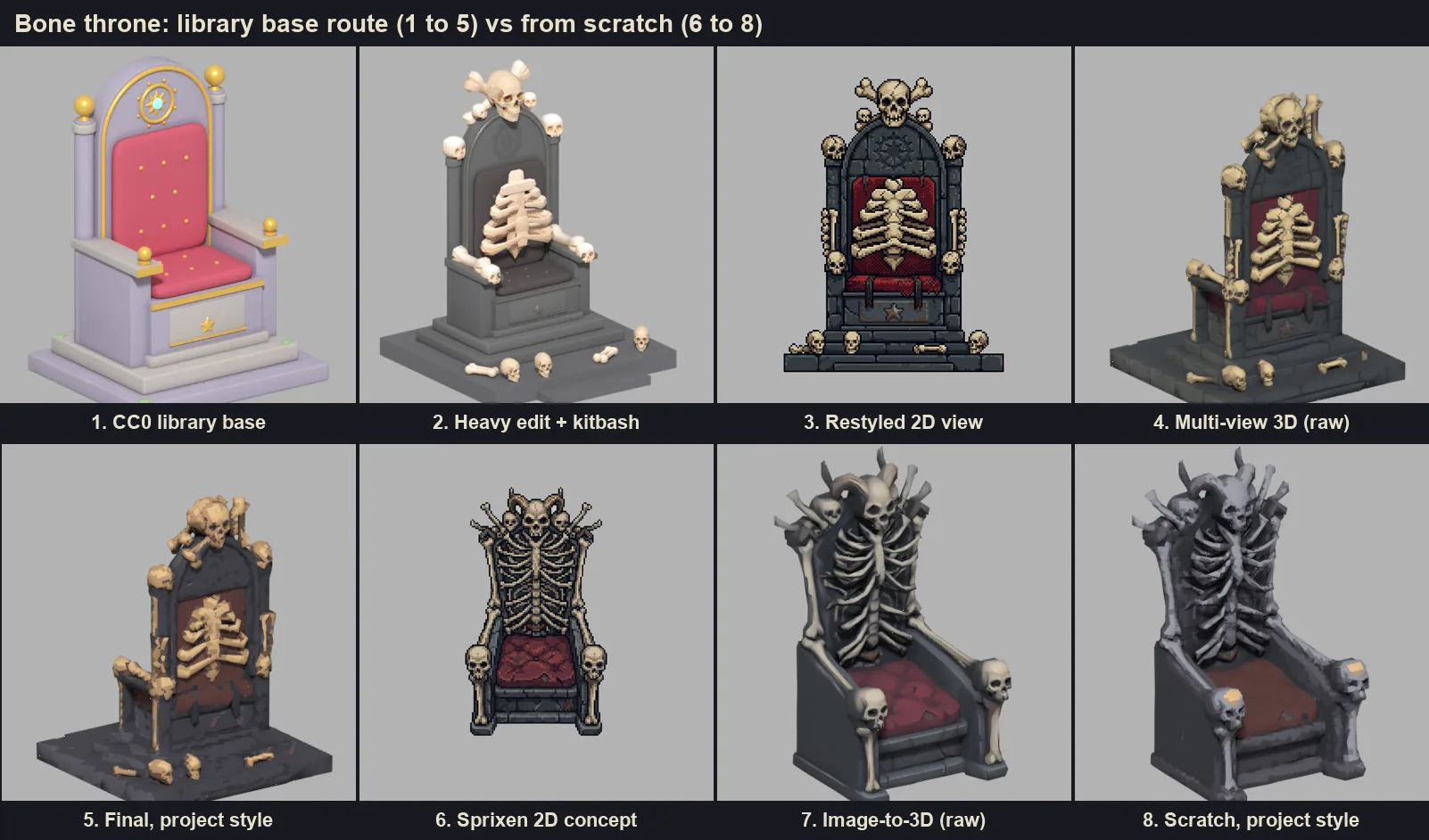
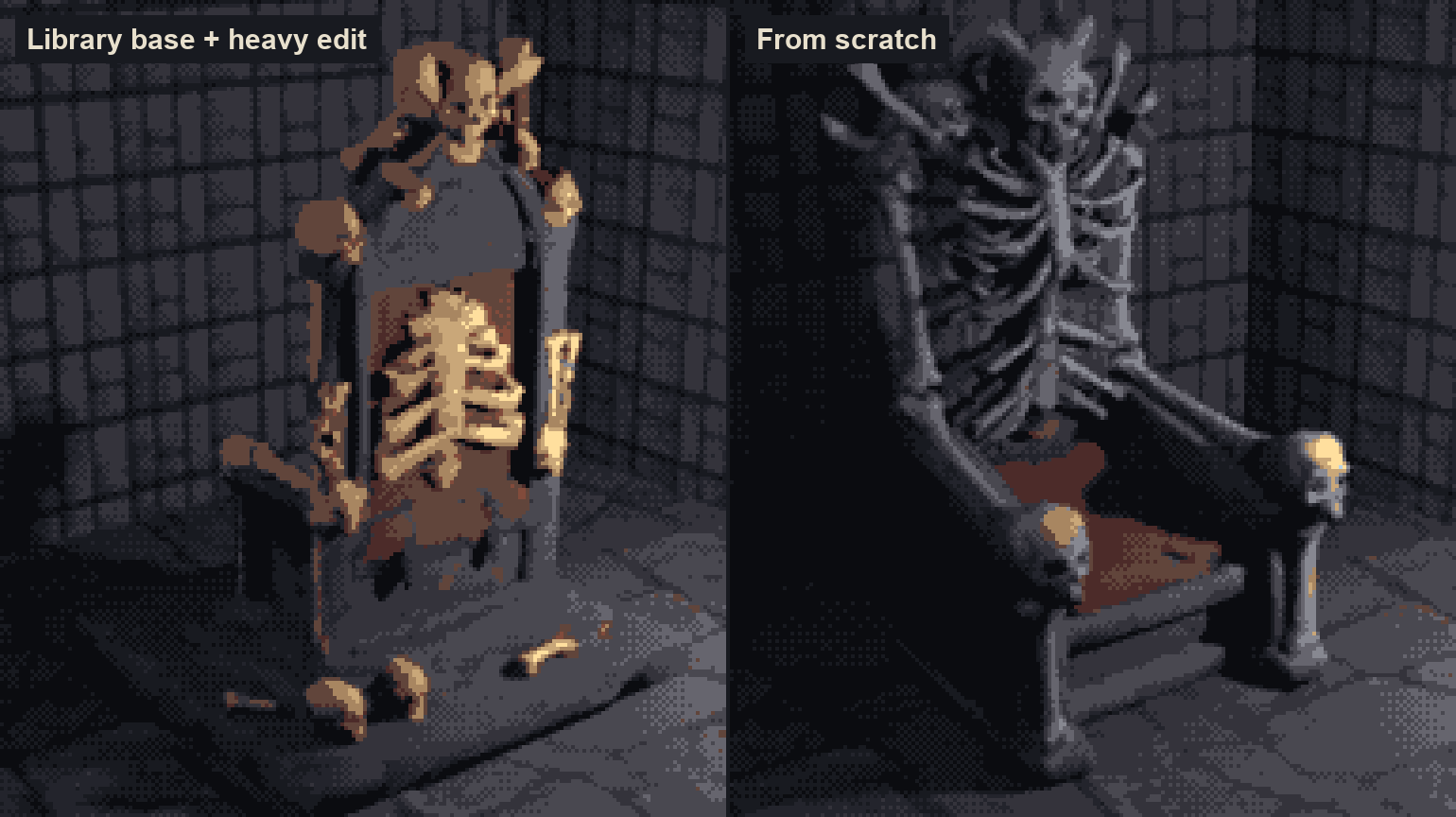
Library base. A search for throne, chair, skull, bone, rib and skeleton returned a CC0 procedural throne (16,148 faces, 1.50 x 1.30 x 2.08 m), CC0 skulls, bones and a ribcage from KayKit's Halloween Bits, and a low poly skull. The heavy edit removed 120 loose decorative parts (a gem, a medallion, gold spheres), made the backrest 45% taller above the seat, widened the piece by 25%, added a 0.20 m plinth and a front step, and placed 17 kitbash pieces: a skull crest with two crossed bones, six skulls on the posts and arms, two bones on the arms, ribs on the backrest, and three skulls and two bones on the step. The blockout ended at 26,328 faces and 2.40 x 2.50 x 3.235 m after three script iterations of about 2 seconds each.
Rebuilt from four restyled views, the model came back at 4,574 faces, only 4% narrower and 3% shallower than the blockout. Every ornament we placed reached the 3D model: crest, crossed bones, post and arm skulls, ribs, seat, steps and the skulls on the floor. After the style pass it measures exactly 2.40 x 2.50 x 3.235 m, with the pivot at the base, a 128 px color texture with nearest filtering using 11 of the 16 palette colors, and a file of 174 KB.
From scratch. The concept took 37 seconds, and image-to-3D returned 4,856 faces. The result is more organic, with the whole backrest turned into a skeleton and horns on the crest, and just as detailed. It also lost the plinth: the project draws sprites from above, and the concept never showed one. Its footprint came out 1.90 x 1.76 m against the 2.40 x 2.50 m we had planned. After the style pass it weighs 182 KB.
Both versions broke in one shared place. The seat's red turned brown under palette lock, because project A's palette has no saturated red. Small areas of the 128 px texture atlas also came out blotchy.
The silhouette check that saved the edit route
The weak point of the heavy edit route is the restyle step. Across 14 restyle calls for both cases, 5 views came back with the wrong silhouette: a stone arch invented around the throne, ribs drawn on the back view, a side view replaced by a front view, an arm rotated forward, and a mirrored view with the skull facing the wrong way. Any of those fed into the rebuild would have produced a wrong model.
A cheap, deterministic check caught all five: compare each restyled view's silhouette with the blockout's using intersection over union (IoU), the share of pixels the two shapes have in common out of all the pixels either one covers. The final throne views scored 0.925, 0.922, 0.951 and 0.875. The rules we took from the test:
- Redo only the views that score below about 0.85.
- For side views, also test the mirrored image, since one failure was a correct view flipped.
- Reject any view that adds structure, even with a decent score.
- Write the restyle prompt for a strict silhouette from the first call, state that the reference image is for palette, texture and dithering only, and give the back and profile views their own instructions: no rotated limbs, no invented details on the back.
Case 2: the ghoul knight
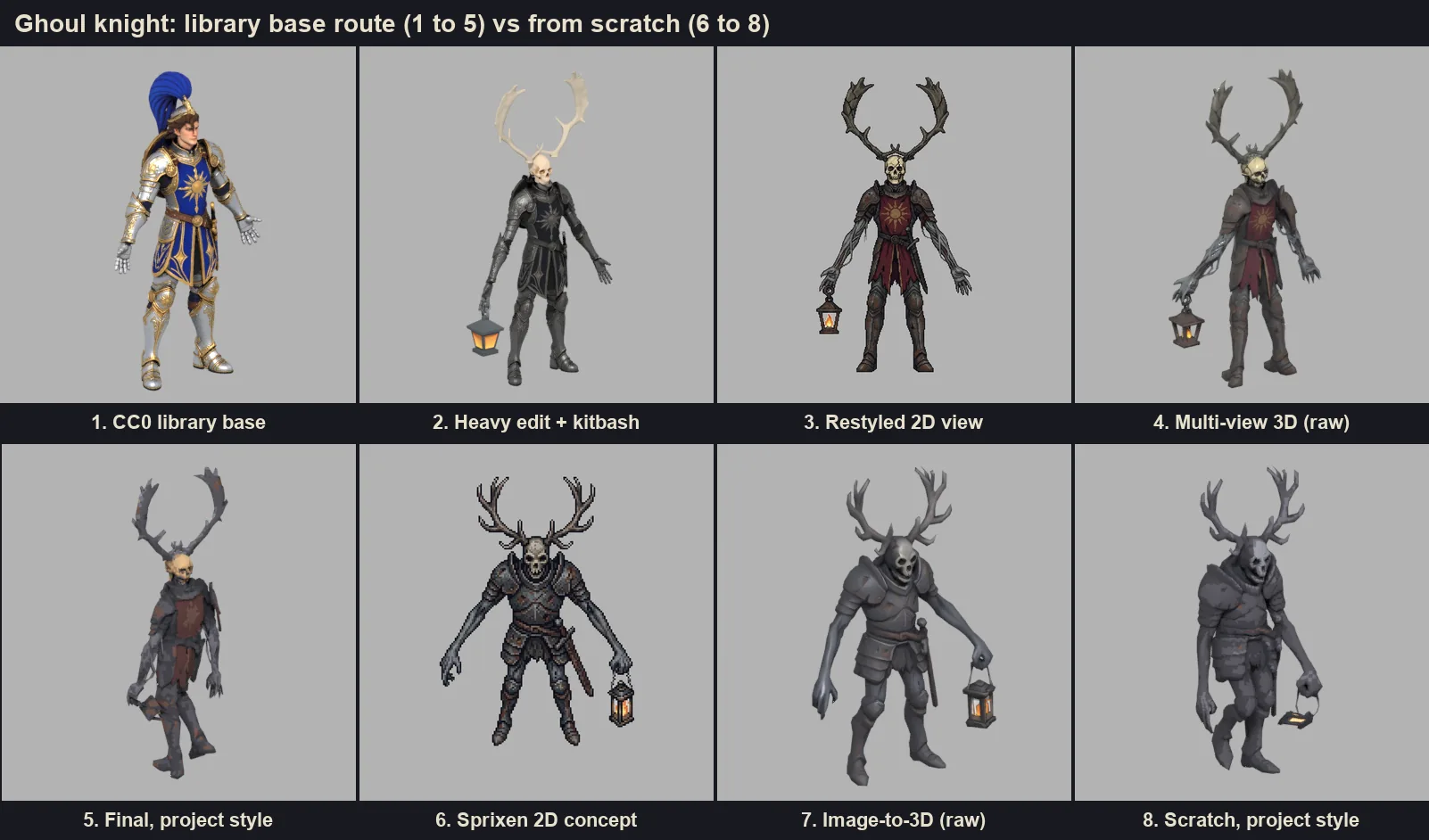
The library had knights, zombies, skeletons, antlers and lanterns, and no ghoul knight. The base was a CC0 rigged armored knight: 291,910 faces, 24 bones, 2.10 m tall, and flagged in its listing as made with AI assistance, which we recorded in its provenance even though the license is CC0. KayKit and Quaternius characters were ruled out for their chibi proportions. The edit removed the head through its skin weights (9,498 vertices) and the plume as loose parts (12,214 vertices), made the arms 30% longer and 20% thinner and the legs 8% longer, darkened the armor, and added a 0.26 m skull, a mirrored pair of CC0 deer antlers and a CC0 KayKit lantern hanging from the right hand. The blockout stood 2.699 m tall.
The rebuild matched the blockout within 3% at 4,925 faces. Antler span, knee-long arms, skull, tabard and lantern all arrived as drawn. Auto rig took the body with its antlers and lantern on the first try and produced a 57 frame in-place walk. After the style pass: 2.699 m, 13 palette colors, skin and walk kept, 361 KB.
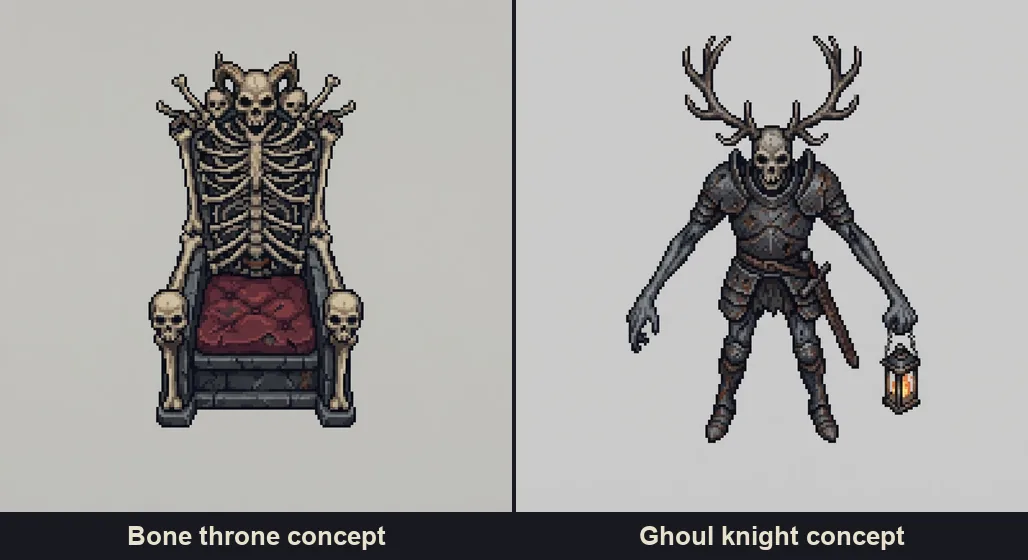
From scratch, the 2D concept was already very good: coherent anatomy, clawed arms, a sword at the waist and the lantern. Its 3D model (4,964 faces) came out sturdier and more convincing than the edited one, which inherited the original knight's slim build. It measures 1.11 x 0.71 m at the same 2.70 m height, with 14 colors and 331 KB. On the edited version, the kitbashed skull also looked small on the armor's broad shoulders.
On both versions the lantern bent with the arm and flattened against the thigh during the walk. Held objects need to be separate meshes on a hand socket, which we cover in how to rig and animate 3D characters with AI.
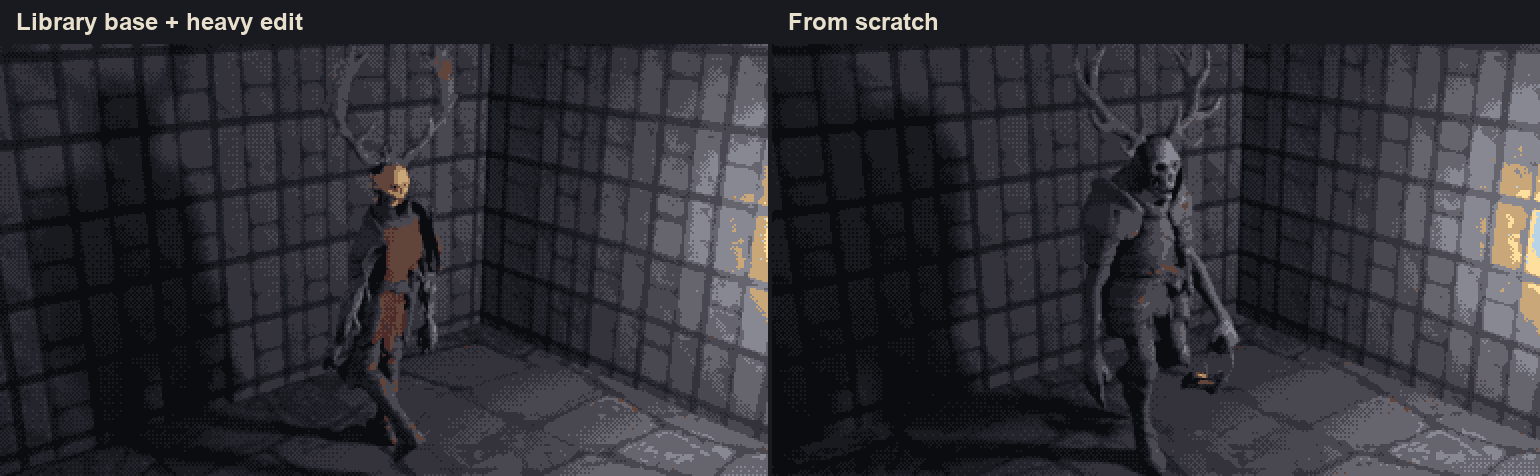
Quality, control and effort
| Library base + heavy edit | From scratch | |
|---|---|---|
| Shape control | Within 3% to 4% of the planned blockout | Composition and size follow the concept |
| Bone throne | Exact footprint, plinth and step as planned | More organic, equally detailed, no plinth, 1.90 x 1.76 m |
| Ghoul knight | Matches the blockout, slim inherited build | Sturdier and more convincing |
| Effort | An agent writing kitbash scripts, 3 iterations, restyle retries gated by IoU | Two generation calls |
| Game-ready output | Both just under 5,000 faces; props under 200 KB and rigged characters under 400 KB after the style pass | |
Collision meshes and LODs were not part of the test on either route.
Our recommendation
- Adapt a library piece as is when it already fits after the style pass, which covers most furniture and clutter. Searching the library is free and adapting a piece costs 2 credits.
- Use a library base with a heavy edit for props, furniture and architecture with a defined size or composition: a centerpiece that must fill a 2.4 m dais, a door that must match a wall kit, anything that has to line up with other pieces.
- Generate from scratch for creatures and characters described in text. The concept step brings better anatomy and character than an edited base, for less effort.
Two details apply to both routes. Ask for a 3/4 front concept when it will become 3D, whatever angle the project uses for sprites, and keep one or two accent colors in the palette so reds survive the lock. To try the from scratch route on your own project, set the project style and open the 3D Studio.
FAQ
What is kitbashing in 3D?
Building a new model by combining and editing parts of existing ones, for example adding library skulls and bones to a plain throne. It gives exact control over size and composition and reuses work that already exists.
Is it better to edit a library model or generate a new one with AI?
For props and set pieces with a planned size or composition, a heavily edited library base gave us exact shapes. For creatures and characters, generating from a 2D concept gave equal or better quality with far less work.
How do you check that an AI restyle kept the shape?
Compare silhouettes. Render the blockout and the restyled view as masks, compute intersection over union, redo any view below about 0.85, and test side views mirrored as well.
Can I use CC0 models that were made with AI?
CC0 allows any use, including commercial. Record the provenance anyway: Steam asks developers to disclose AI-generated content, and some mod hosts and stores have their own AI rules.
How big are the finished models?
Both thrones landed under 5,000 faces and under 200 KB, and both rigged knights under 5,000 faces and under 400 KB, after the project style reduced textures to 128 px.
Make 3D assets that match your game.
Set a project style from one reference image, then generate or adapt textured GLB models in real-world meters, auto rig them and add in-place animations for Godot, Unity or three.js.
Related Articles
How to Make 3D Game Assets with AI: A 2026 Guide from Real Tests
How to make 3D game assets with AI: a style bible from one reference, library models vs custom generation, real sizes, rigging, GLB export and the pitfalls we hit.
One Art Style Across 2D and 3D Game Assets: How One Reference Image Sets the Rules
How one reference image becomes a style bible that every 2D and 3D asset follows: palette, texel density, filter, proportions, wear, light and six materials. Two real bibles compared.
How to Make a Game in the "omw" Style: The Dark Gothic Pixel RPG Look Explained
How the viral "omw" dark gothic pixel RPG look works: low-res 3D, a 16 color palette, dithering, fog, torch against moonlight, plus a Godot 4 setup you can copy.