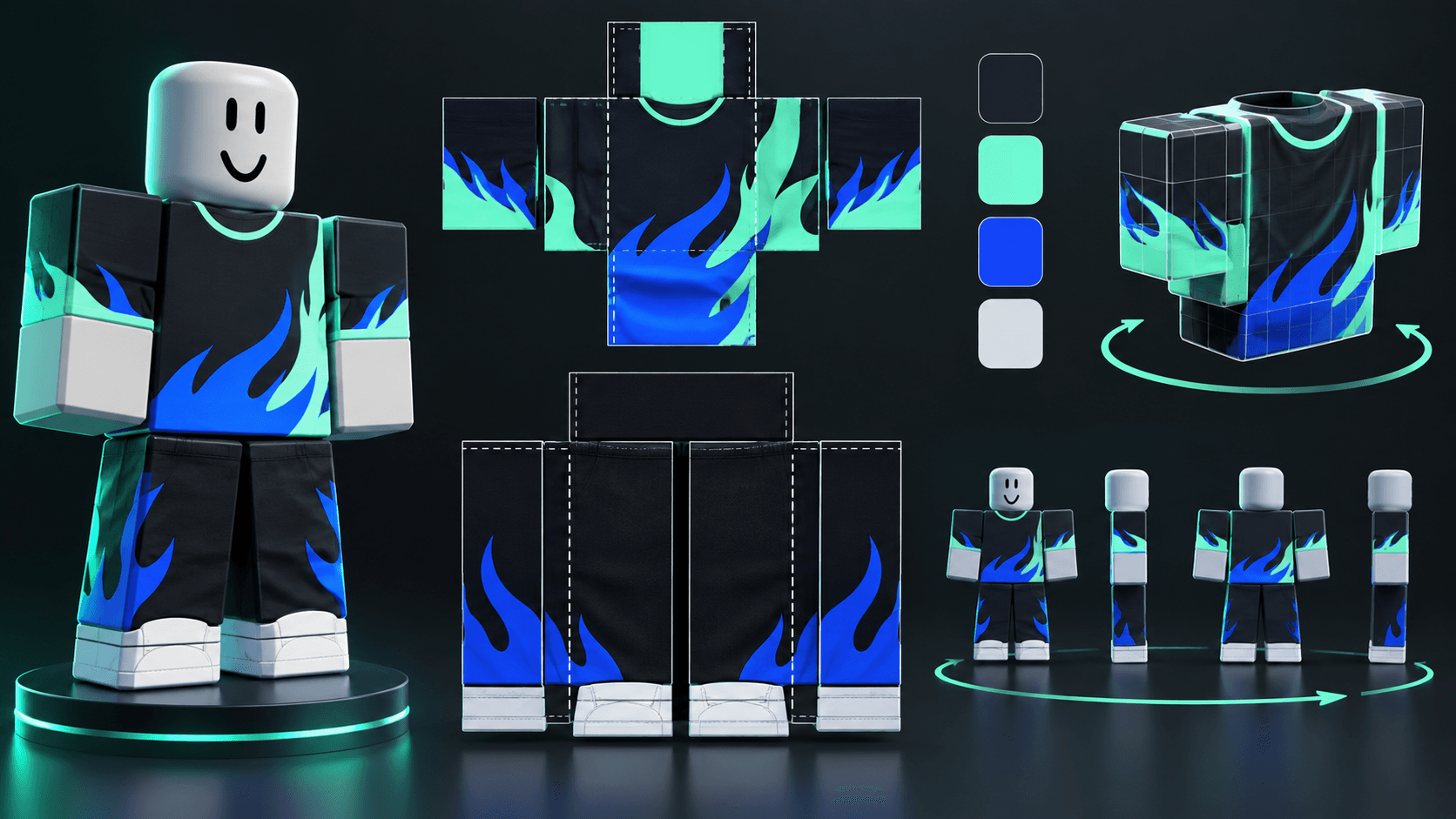
Roblox Classic Clothing Templates: 585x559 Layout, Regions and AI Pitfalls
How Roblox classic shirts and pants templates are laid out, why 585x559 files cause confusion, and how to use AI for design without breaking seams or texture regions.
The 585x559 number appears in many Roblox clothing tutorials, but it is not a universal instruction to draw a shirt on a blank 585x559 canvas. Classic clothing uses official templates with regions that map to an avatar's torso, arms and legs. The template is the contract. Ignore it and the design may look correct in an image editor while wrapping incorrectly in Studio.
Classic clothing in one minute
Classic clothing is the older 2D clothing system: classic T-shirts, shirts and pants. A classic T-shirt is a single square image that sits on the avatar's front torso. Classic shirts and pants use Roblox's templates, which contain the regions for the front, back, sides, top and bottom of the body parts. Read the current official documentation before uploading because template rules, moderation and fees can change: classic clothing.
Where 585x559 fits
Many community templates are exported at 585x559 or similar dimensions because they include guides, labels and padding around the actual texture regions. Roblox's documentation examples and third-party templates are not always identical in canvas dimensions. The reliable rule is: start from the current official shirt or pants template, preserve its dimensions and guides, and export the finished texture in the format Roblox accepts. Do not resize a template just to reach a number copied from a search result.
Region map
The official template is made of rectangular regions, not one continuous flat shirt. Each region corresponds to a body surface and has a fixed relationship with its neighbors. A design that crosses the front-to-side seam needs enough bleed and alignment to survive the wrap. Roblox documents common regions such as 128x128 front and back panels, 64x128 arm panels, 128x64 top and bottom panels, and 64x64 side areas. Treat those dimensions as texture regions, not as a recommendation to repaint the template from memory.
A safe design workflow
- Download the current shirt or pants template from Roblox Creator documentation.
- Keep the guide layer locked and work on a layer above it.
- Design the largest readable shapes first: jacket opening, armor plates, stripes or a logo.
- Check both the flat template and a 3D avatar preview.
- Remove guide lines before export.
- Upload privately and test in Studio before publishing.
What AI gets wrong
Image models are good at generating a jacket concept and bad at respecting a UV-style layout. They may mirror the sleeve, place a logo across a seam, draw fake template labels, or add fingers and a face where the avatar mesh will never show them. The useful workflow is to ask AI for a concept or a flat material direction, then place the final design into the official template yourself.
Sprixen now generates a matching classic shirt and pants as separate 585x559 PNG files from one brief. The result includes a rotatable block-avatar preview so you can inspect the front, sides and back. This is a starting point, not a guarantee of Roblox compatibility: compare the exported regions with the current official template and test the clothing on a Block Avatar rig in Roblox Studio before uploading or publishing.
Classic shirt versus layered clothing
Do not use a classic template for a layered clothing asset. Layered clothing uses a 3D mesh, texture, attachments and inner and outer cage data. It is a different production pipeline with different validation. If the design needs thickness, a collar that stands away from the body, or a jacket that overlaps the torso, it probably belongs in layered clothing rather than a flat classic shirt.
Before you publish
- Check the texture on a male and female R15 avatar if your design depends on proportions.
- Inspect the armpits, waist, cuffs and lower hem at close range.
- Look for accidental transparency, unreadable details and seam jumps.
- Confirm that the asset follows Roblox's marketplace and intellectual property policies.
- Keep the source file with guides in case a future template changes.
A classic clothing template is a mapping document, not a blank canvas. Use the current Roblox template as the authority, inspect any AI-generated wrap and verify the exported files in Studio before publishing.
You can create only the classic avatar outfit for 6 credits, or include it in the complete Roblox Creator Pack with the icon, thumbnails, UI kit and VFX for 23 credits. Sprixen does not upload, moderate or publish clothing on Roblox for you.
Make game art that stays in one style.
Generate sprites, animations, tiles and effects that share one locked style per project, in the web app or straight from Claude Code and Cursor. 6 free credits on signup, no credit card required.
Related Articles
How to Make 3D Game Assets with AI: A 2026 Guide from Real Tests
How to make 3D game assets with AI: a style bible from one reference, library models vs custom generation, real sizes, rigging, GLB export and the pitfalls we hit.
How to Make a Game in the "omw" Style: The Dark Gothic Pixel RPG Look Explained
How the viral "omw" dark gothic pixel RPG look works: low-res 3D, a 16 color palette, dithering, fog, torch against moonlight, plus a Godot 4 setup you can copy.
How to Mod Games with AI Agents: A 2026 Guide for Claude Code and Codex
How to mod games with AI agents in 2026: what changed, the universal-modder workflow in Claude Code, art that matches the original game, and the legal lines to respect.